Halo
 Shedi
 Gold Master Kit
Claude Code guides
10 Claude Code skills to ship an app
Ten skills, grouped by the stage they help with: design, build and test, and launch. Each one says what it does, which part of the repo to install, and the line that installs it. Pick two or three for the stage you are in, not all ten.
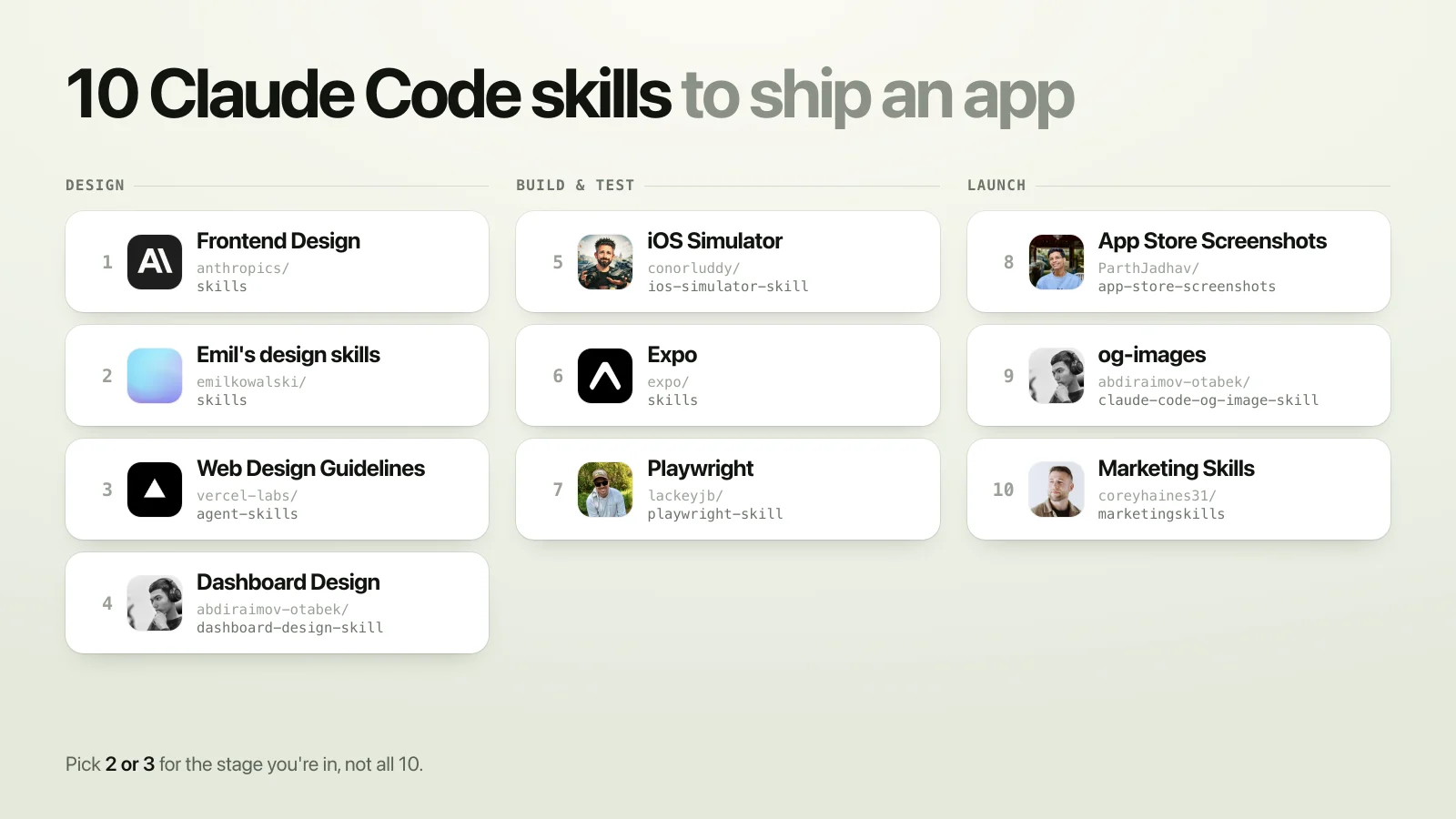
Two of these, Dashboard Design and og-images, are free skills I made. The other eight are by other people, and I have no connection to them.
Design
Look and feel, before and while you build.
1Frontend Design
 anthropics/skills198K starssee the repo
Anthropic's own skill for front ends that don't look like every other generated page: a clear direction, real type choices and layouts built for the product. It's one skill in Anthropic's official repo, next to the document and art skills.
Pick: frontend-design
npx skills add anthropics/skills --skill frontend-design2Emil Kowalski's design skills
 emilkowalski/skills58.7K starsMIT
Twenty skills from a design engineer known for interface polish: motion, gestures, Apple-style design, taste, even write-swift for SwiftUI. For an app, start with emil-design-eng and apple-design, add animate when the screens are done.
Pick: emil-design-eng, apple-design, animate
npx skills add emilkowalski/skills3Web Design Guidelines
 vercel-labs/agent-skills34.7K starssee the repo
Vercel's checklist for web interfaces as a skill: it reviews your pages against their guidelines for layout, forms, focus states, motion and performance. The same repo has React and deploy skills if your landing page runs on Vercel.
Pick: web-design-guidelines
npx skills add vercel-labs/agent-skills --skill web-design-guidelines4Dashboard Design
 abdiraimov-otabek/dashboard-design-skill1.1K starsMIT
Dashboard UI for the web and SwiftUI: KPI cards, charts, heatmaps, comparison periods, date pickers, filters, empty and loading states, then a screenshot pass at wide and phone widths. Useful for any app with a stats or admin screen.
Pick: dashboard-design
npx skills add abdiraimov-otabek/dashboard-design-skillBuild and test
Run it, click through it, catch what breaks.
5iOS Simulator
 conorluddy/ios-simulator-skill1.3K starsMIT
Lets the agent build, launch, tap through and screenshot your iOS app in the Simulator with Xcode's command line tools, and keeps the output short so it doesn't flood the context.
Pick: ios-simulator-skill
npx skills add conorluddy/ios-simulator-skill6Expo
 expo/skills4.2K starsMIT
The Expo team's own skills for React Native apps: routing, native UI, data fetching, upgrades, and EAS for builds, updates and App Store and Play Store submission. Install only the parts your app uses.
Pick: expo-router, expo-ui, eas-app-stores
npx skills add expo/skills7Playwright
 lackeyjb/playwright-skill3.3K starsMIT
General browser automation for coding agents. Point it at your landing page or web app and it clicks through the flows, fills forms and takes screenshots, so you see breakage before users do.
Pick: playwright-skill
npx skills add lackeyjb/playwright-skillLaunch
What people see first: screenshots, link previews, the words.
8App Store Screenshots
 ParthJadhav/app-store-screenshots8K starsMIT
End to end App Store screenshot creation for iPhone apps: frames, captions, several languages and an export for App Store Connect.
Pick: app-store-screenshots
npx skills add ParthJadhav/app-store-screenshots9og-images
abdiraimov-otabek/claude-code-og-image-skill3 starsMIT
Link previews, a Product Hunt gallery and an X header made from your app's real UI. Every image is checked before the agent reports back: exact size, contrast on the real pixels, a title that reads at feed size. It also exports your real app icon on macOS 26 and later.
Pick: og-images
npx skills add abdiraimov-otabek/claude-code-og-image-skill10Marketing Skills
 coreyhaines31/marketingskills61.9K starsMIT
Over fifty marketing skills from a SaaS marketer: launch plans, App Store optimisation, copywriting, pricing, directory submissions, SEO for AI answers. For launch week, take launch, aso and copywriting.
Pick: launch, aso, copywriting
npx skills add coreyhaines31/marketingskillsQuestions
How do I install a Claude Code skill?
Run npx skills add owner/repo in your project, or add the repo as a plugin marketplace in Claude Code with /plugin. A repo with several skills asks which ones you want; --skill name installs one.
Should I install all ten?
No. Pick two or three for the stage you are in. Every installed skill adds to what the agent reads, and skills that overlap can pull in different directions.
Are these free?
All ten are free to install. Eight use the MIT license; Anthropic and Vercel publish theirs under the terms in each repo.
Which skill makes App Store screenshots?
App Store Screenshots by ParthJadhav covers iPhone sets end to end. For Mac apps, and for link previews and launch posts too, Gold Master Kit does it from your real UI and checks every file.
How were these picked?
By stage: two to four skills each for design, building and testing, and launch, chosen for what they do for a shipping app. Star counts were read on GitHub on 22 November 2026.
Gold Master Kit
The launch stage, done for you
Gold Master Kit is five Claude Code skills for launching a Mac or iOS app: App Store screenshots, link previews, launch posts, a launch film and a landing page, made from your app's real UI and checked before you see them. og-images, number 9 above, is its free part. $39 once until 1 December (Black Friday and launch week), then $89.