Halo
 Shedi
 Gold Master Kit
Claude Code
8 Claude Code Skills for the Launch Work Founders Keep Avoiding
Building the app is the fun part. Then launch week shows up and asks you to be a designer, a copywriter, a video editor, a web developer and an analyst, all before Tuesday.
So most of us skip it. The App Store screenshots are raw captures. The link preview is a stretched logo. The launch post gets written at 1 am and sounds like it. Nobody checks which post brought the sales.
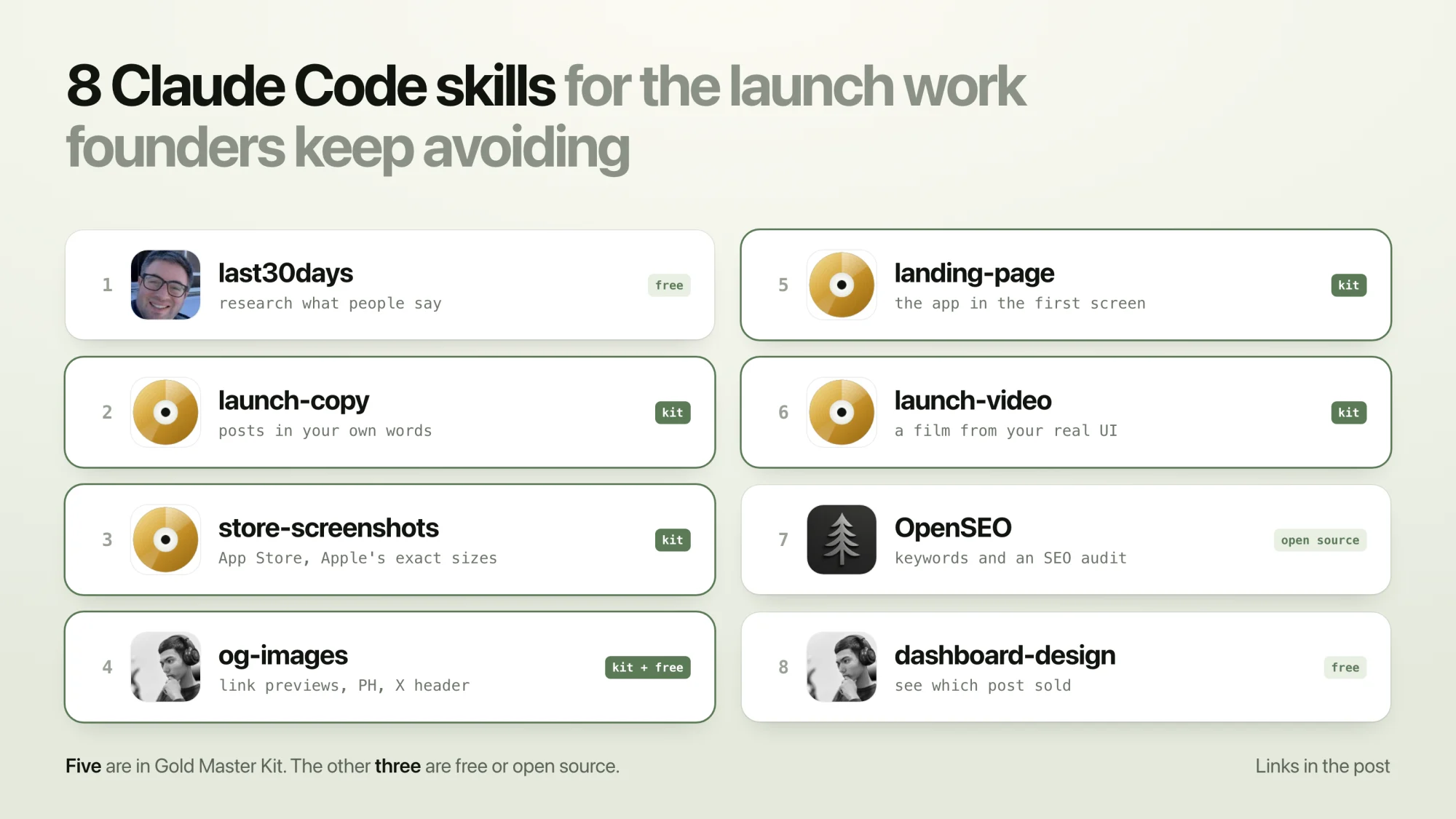
I make two small Mac apps on my own, Halo and Shedi, and I have skipped every one of those jobs at least once. These are the eight Claude Code skills I now hand that work to. Five are from my own paid kit, one is my free skill, and two are from other makers. I say which is which below.
1. last30days: find out what people say before you write a word
The work you avoid: research. You write the launch post from what you think people care about, not from what they are saying this month.
last30days by mvanhorn searches Reddit, X, YouTube, TikTok, Hacker News, GitHub and the web for one topic over the last 30 days and pulls the posts with their engagement. Ask it about "Mac menu bar apps" or "App Store screenshots" and you get the complaints, the words people use and the posts that did well.
Use it before you write anything in this list. The best headline is usually a sentence a stranger already wrote.
Free and MIT: https://github.com/mvanhorn/last30days-skill
2. launch-copy: the posts, in your own words
The work you avoid: writing the same launch in five formats, each with its own rules.
launch-copy reads your README, your site and your changelog, then writes a Product Hunt page (tagline, description, maker comment, gallery captions), a three-post X thread, a Threads post and an r/macapps post that follows the subreddit's current rules.
Then a script checks every file. Character limits per channel. No hype words. No dashes, because r/macapps' own FAQ names em dashes as a trigger for automatic removal. And no number that is not in your README, site or changelog, so it cannot invent "10,000 users" for you.
Part of Gold Master Kit.
3. store-screenshots: App Store screenshots at Apple's exact sizes
The work you avoid: a day in Figma, five frames, and an upload that App Store Connect refuses.
store-screenshots captures your app's real screens, puts a short headline from your own site over each one, and renders them at the sizes Apple accepts: 2880 by 1800 and 1440 by 900 for the Mac, 1206 by 2622 for iPhone, with a drawn iPhone frame. Any language, right to left too, and a zip for App Store Connect.
Then it opens every PNG and measures it: exact size, no alpha channel (App Store Connect rejects it), text contrast on the real pixels, the font that actually drew the text, and how much of the frame is your app. At least 45% of each shot has to be the UI. A shot that fails is fixed before you see it.
Part of Gold Master Kit.
4. og-images: the link preview everyone sees first
The work you avoid: the image that shows up when someone shares your link. Most indie sites still show a logo on white, or nothing.
og-images makes a 1200 by 630 link preview with a large title, your icon and a real capture, a Product Hunt gallery of 4 to 6 slides at 1270 by 760, an X header at 1500 by 500 that keeps clear of your avatar, and the meta tags to paste. It checks that the title still reads when the card is shown 600 pixels wide, and that text contrast is at least 4.5 to 1.
This one is free and open source, and it is also in the kit: https://github.com/abdiraimov-otabek/claude-code-og-image-skill
5. landing-page: a site that shows the app in the first screen
The work you avoid: the landing page, so you use a template and get the same dark gradient and six feature cards as everyone else.
landing-page builds a one-page site from your real captures in one of five directions, after you approve a type and colour specimen. Every word comes from your README and site. The Buy or Download button is wired, and the SEO set is done: title, meta, Open Graph, schema, sitemap, favicons.
It checks the page at 390, 768, 1024 and 1440 pixels wide: contrast, fonts, links, spacing and a list of banned AI-page patterns. I wrote up the study of 73 Mac app sites behind its rules here: the 73-site study
Part of Gold Master Kit.
6. launch-video: a short film without a video editor
The work you avoid: the launch video. It never gets made, so the X post and the Product Hunt page go out without one.
launch-video makes an 18 to 32 second film from your real UI: 1920 by 1080 for X and the web, 1080 by 1920 with its own layout for Reels, TikTok and Shorts, and a poster for each. It works with the sound off. The music and sound effects are composed in code, so they are yours to use commercially.
Then it checks the MP4s: size, codec, length, frozen frames, reading time for every caption, safe areas and loudness.
Part of Gold Master Kit.
7. OpenSEO: the SEO you keep meaning to look at
The work you avoid: SEO, because the tools cost more per month than your app makes.
OpenSEO is an open source alternative to Semrush and Ahrefs, made by EveryApp, and it ships Claude Code skills. Two are worth running in launch week. keyword-research turns a few seed topics into a list of keywords worth targeting, with their metrics and search results. seo-audit looks at your site and leads with the one to three changes most likely to bring more search traffic that converts.
You can self-host it with your own DataForSEO key or use the hosted version, which is pay as you go: https://github.com/every-app/open-seo
8. dashboard-design: the numbers page you never build
The work you avoid: looking at what worked. You post everywhere, then never check which post brought the sales.
dashboard-design is my free skill for building that page properly: KPI tiles, charts, comparison periods, date pickers, ranked lists, empty and loading states, and a screenshot check at the end. It is distilled from 127 shipped dashboards and had 1,185 stars on GitHub when I wrote this.
Here is why it matters. In the last week, X sent 186 visitors to my kit's site and none of them bought. One Reddit post sent 18, and two of them bought. Without a page that shows that, I would have kept writing for X.
Free: https://github.com/abdiraimov-otabek/dashboard-design-skill
What they have in common
The good skills here do not stop at making the thing. They open the file and check it: the size, the contrast, the font, the character count, the number that has to exist in your README. That is the part you would skip at 1 am, and it is the part that decides whether App Store Connect, Reddit or a stranger on X accepts what you made.
The kit
Skills 2 to 6 are Gold Master Kit, five skills I built for launching a Mac or iOS app alone. It is $89 once, with every future update, and $39 until 1 December for Black Friday and launch week:
In Claude Code, after you buy:
/plugin install gold-master-kit --marketplace goldmasterkit/gold-master-kit
If you want to try one first, og-images and dashboard-design are free. last30days and OpenSEO belong to their own makers, who have nothing to do with this kit.
Facts checked on 25 November 2026. Visitor and order counts are from my own analytics for 19 to 25 November.
Gold Master Kit
Launch week, checked before you see it
Five Claude Code skills for launching a Mac or iOS app: App Store screenshots, link previews, launch posts, a launch film and a landing page, made from your app's real UI. Every one runs its own checks before it says done. $39 once until 1 December (Black Friday and launch week), then $89.